HomeProducts › B2B Ecommerce
B2B ECOMMERCE

Let your customers reorder themselves.

A branded ordering portal on the same catalog, pricing and stock as your route app — so an order placed at 11pm behaves exactly like one a rep writes at 11am.

  • Your branding
  • Their contract prices
  • Open all night
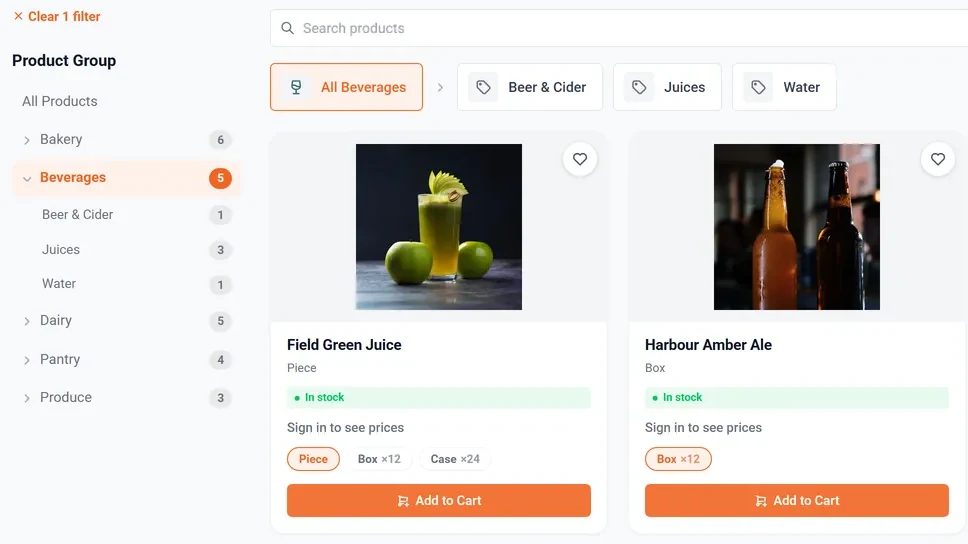
The OrderPulse ordering portal on the web: a category sidebar drilling from Beverages into Beer & Cider, Juices and Water, and two products with photographs, live stock status and per-unit pack options of piece, box of twelve and case of twenty-four.
The same catalogue in the OrderPulse buyer app on a phone, showing contract pricing against list price and live stock.
Their prices, not list Contract pricing, breaks and promotions.
Reorder from history Last order, usual order, standing order.
Real availability The live ledger, not a nightly snapshot.
One order queue No second inbox for the office to re-key.

Three ways in, one order record

A portal that creates a separate inbox has moved the work, not removed it.

Rep at the shelfwrites it on the route11:12Officetakes it by phone15:40Customer portalplaces it themselves23:04same cataloguesame contract pricesOne order recordSO-2026-0035 · $394.70Lakeside GroceryNet 30Deliver Thu 28 AugPickedThursday’s runLoadedRoute 14 · van 4Invoicedagainst Net 30One record, entered once — no second inbox and nothing to re-key downstream.

The parts a trade buyer actually decides on

Six things a retail cart has no answer for.

CHOOSE A DELIVERY DAY · ROUTE 14 RUNS TUE & THUMON25TUE26WED27TODAYTHU28FRI29SAT30SUN31MON1TUE2WED3THU4FRI5SAT6SUN7Your route runsNo vehicle serves youOrder by 4pm the day before · cut-off enforced by the route, not a guess
Your customer can only pick a day a vehicle actually reaches them — the calendar is built from the route, not from a guess.

Delivery days from your routes

Only the days you actually serve that account, with your cut-off enforced.

Eaches or cases

Order in any unit you sell, converted and priced by the server.

Quantity breaks

The better price appears the moment the quantity earns it.

Promotions and free goods

Buy-ten-get-two lands in the basket automatically, priced at zero.

Credit and terms in view

Limit, available credit and net terms, so nobody orders past their line.

Amend before the pick

Customers change or cancel their own order until it reaches the warehouse.

The app your customers actually get

Real screens from the OrderPulse buyer app — not a mock-up.
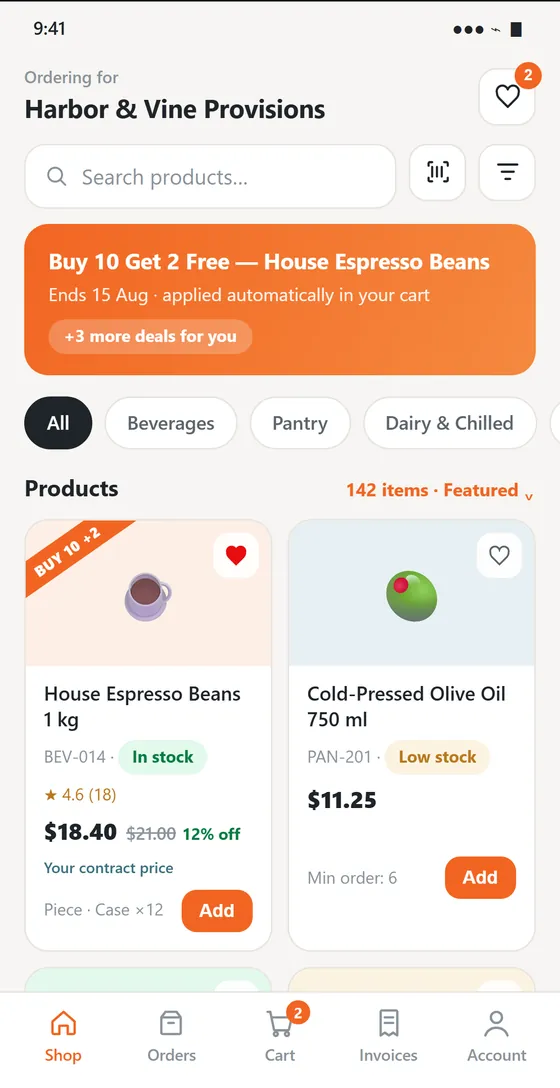
The buyer app shop screen: a promotion banner, category filters, and product cards showing the customer's own contract price of $18.40 against a $21.00 list price, with live stock status.
ShopTheir contract price against list, live stock, and promotions applied automatically.
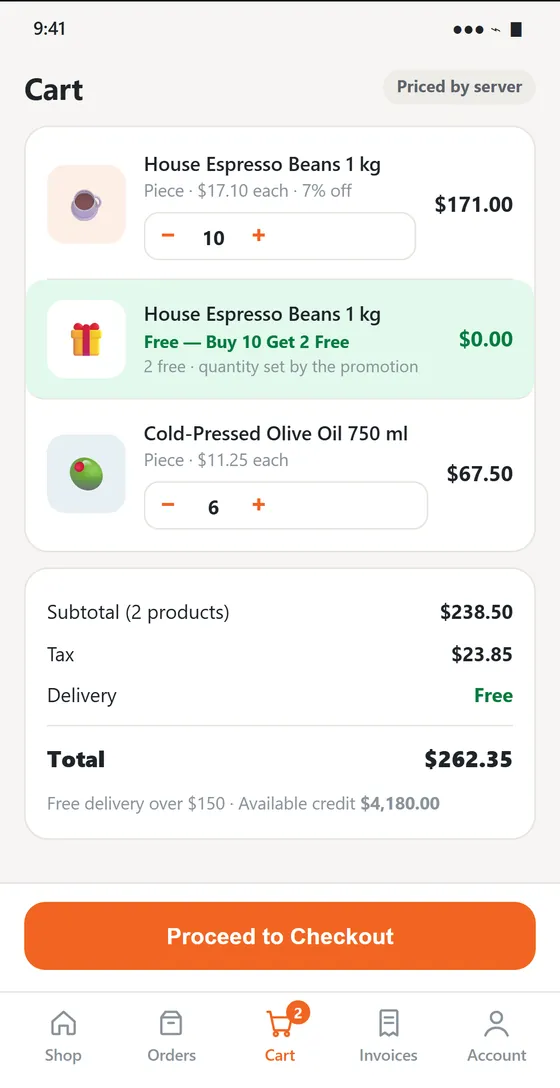
The buyer app cart: two products plus a free promotional line priced at zero, with subtotal, tax, free delivery and a total of $262.35.
CartPriced by the server, free goods added by the promotion, tax and delivery shown before checkout.
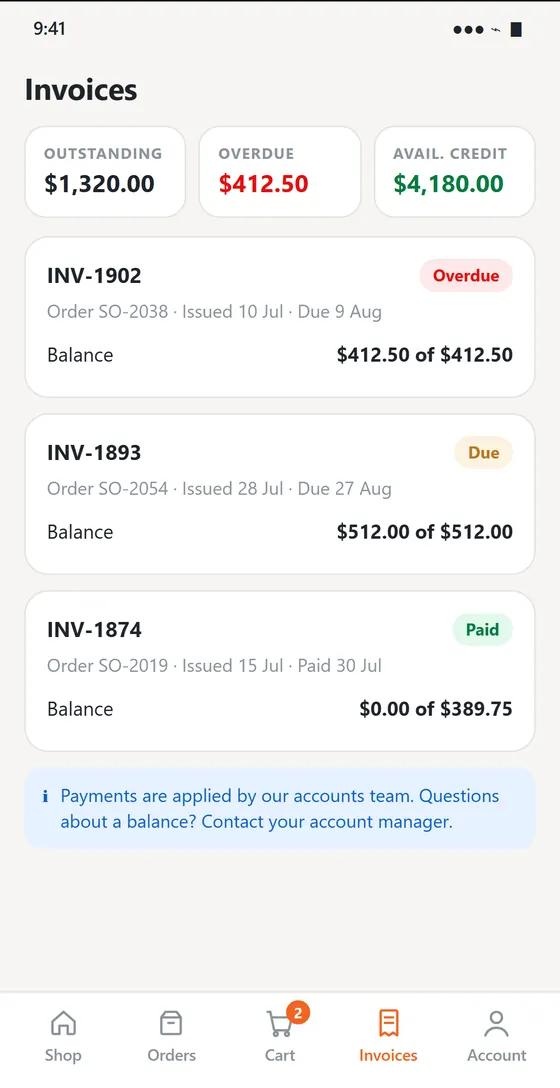
The buyer app invoices screen: outstanding, overdue and available credit totals, then individual invoices marked Overdue, Due and Paid with their balances.
InvoicesOutstanding, overdue and available credit — without a phone call to your office.

Self-service that does not create work

The point is fewer phone calls and fewer re-keyed orders — not a second system to run.

Their prices, not list prices

Customers see their own contract pricing, quantity breaks and active promotions.

Reorder from history

Last order, usual order and a standing order they adjust, instead of rebuilding a basket.

Real availability

Stock reads live from the same ledger the warehouse works from, not a nightly snapshot.

One order queue

A portal order becomes a pick list like any other. There is no second inbox.

Account self-service

Invoices, statements and balances without a phone call to your office.

The rep stays in the loop

The account’s rep sees portal orders and can adjust them before the pick.

Does this cut the rep out?

It does the opposite. Routine reorders — the same twelve lines every Tuesday — are the part of the visit that creates the least value. Moving them to the portal means the rep arrives to sell the new line and fix the shelf, not to copy out last week.

AN ORDER PLACED AT 11PMTue 23:04Order placedby the customerWed 08:10Rep reviewsadjusts if neededWed 14:00Pickedfrom one queueThu 07:30Loadedonto Route 14Thu 10:20Deliveredsigned forThe same path a rep-written order takes — and the rep still sees it before the pick.
The rep still sees the order and can change it before it is picked — self-service does not mean unsupervised.
Fewer phone ordersThe routine twelve lines stop arriving by voicemail and text.
Orders outside your hoursA stock check at 11pm becomes an order instead of a note to call tomorrow.
Better visitsThe rep arrives to sell rather than to write down what the customer already knew they needed.

Works with the books you already keep

Portal orders raise the same invoices and post the same way as everything else on the route.

Frequently asked questions

Is it a separate catalog to maintain?
No. The portal reads the same products, pricing rules and stock the route app and the office use. There is one catalog, and a change to it applies everywhere at once.
Can we control who gets access?
Yes. Access is granted per account, and each customer sees only their own pricing, their own history and their own invoices.
What about customers who will never use it?
Nothing changes for them. The portal is an extra way in, not a replacement — a rep can keep writing their order at the shelf exactly as before.
Does the rep still get commission on a portal order?
That is your rule to set. Portal orders carry the account’s rep, so they can be credited the same way as an order written at the shelf.

See your catalog in a customer’s portal

Bring one account and its price list. We’ll show you what that customer would see when they sign in at 11pm.

Request a Demo