HomeProducts › Back Office
BACK OFFICE

The street lands in your books, clean.

Route settlement, receivables and accounting sync in one place — so the day closes when the last truck comes in, not on Thursday afternoon.

  • Settles daily
  • Two-way sync
  • Roles & permissions
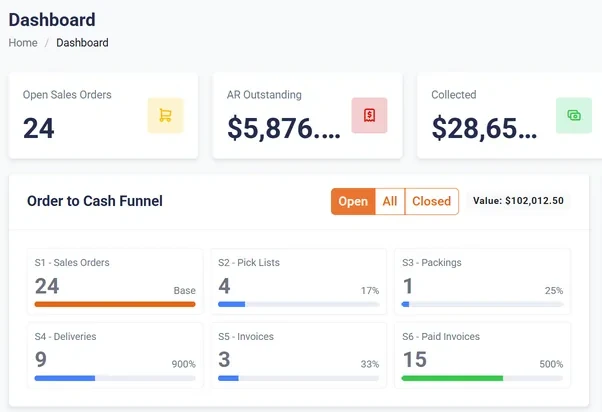
The OrderPulse back-office dashboard: 24 open sales orders, $5,876 AR outstanding and $28,650 collected, above an order-to-cash funnel counting 24 sales orders through pick lists, packings, deliveries and invoices to 15 paid invoices.
Route settlement Loaded, sold, returned and collected — every route, every day.
Two-way accounting sync Invoices out, customers and items stay theirs.
Current receivables Aging that reflects today, not last Thursday.
Exceptions first What went wrong is pushed to the top.

Order to cash, without leaving the system

Seven stages, seven documents, one order number running through all of them.
ORDER TO CASH · EVERY STAGE IN ONE SYSTEM1Estimatequote2Sales orderSO3Pickpick list4Packpacking note5DeliverPOD6Invoiceinvoice7PaymentreceiptReturns, credit notes and RMAs re-enter the same chain rather than living in a spreadsheet.
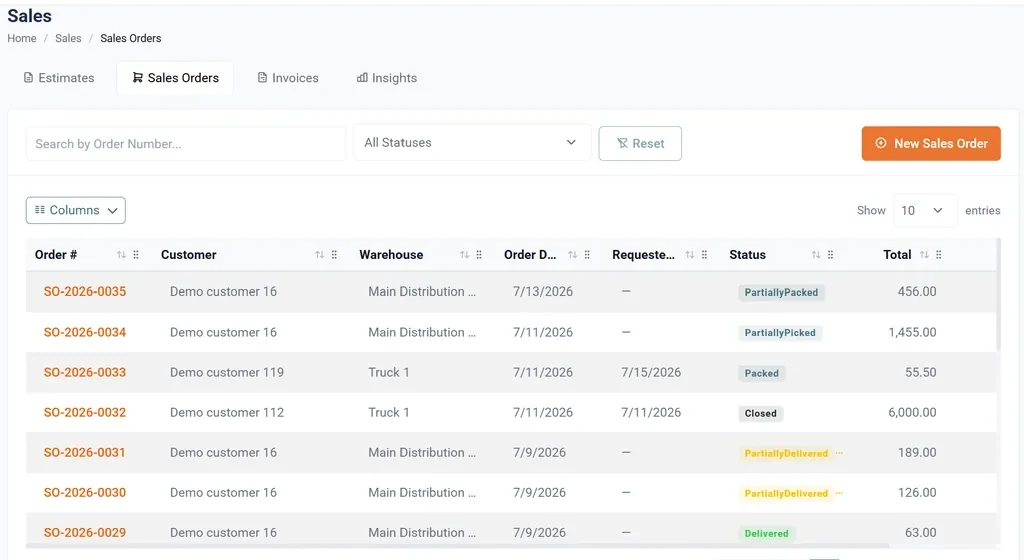
The sales orders list: order numbers, customer, warehouse, order and requested dates, and a status column showing Partially Packed, Partially Picked, Packed, Closed, Partially Delivered and Delivered.
Sales ordersEvery order and its exact stage — picked, packed, delivered or closed — filterable by status and warehouse.
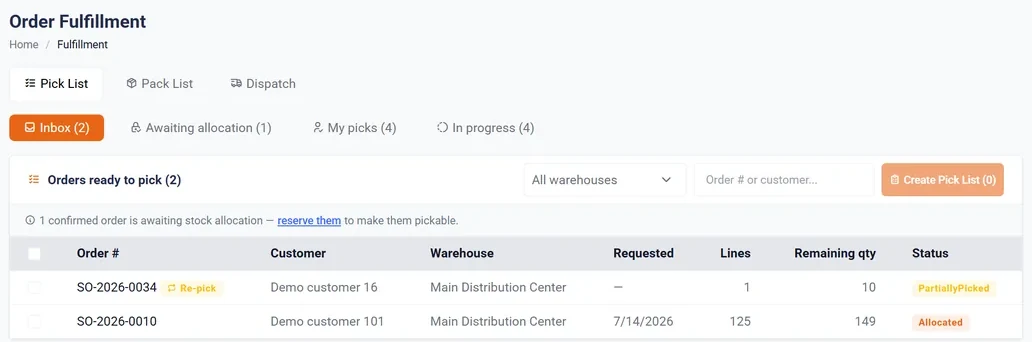
The order fulfilment screen with Pick List, Pack List and Dispatch tabs, an inbox of orders ready to pick, and a warning that one confirmed order is awaiting stock allocation.
FulfilmentPick, pack and dispatch queues, with anything waiting on stock allocation called out rather than silently stuck.

Everything the back office actually covers

Ten areas, one login, one database. No bolt-on for the awkward parts.

Sales Estimates, orders, pick, pack, delivery, invoices, payments and collections.
Returns & credits Customer returns, sales returns, RMAs and credit notes, against the original invoice.
Pricing & promotions Price lists, quantity breaks and promotion rules, enforced on every channel.
Inventory Stock, batches, transfers, adjustments, reorder levels, quarantine and write-offs.
Warehouses & UOM Multiple locations and every unit you buy, hold and sell in.
Route operations Planning, scheduling, live monitoring, route history and van settlement.
Purchasing Vendors, purchase orders and goods receipts feeding the same stock ledger.
Production Recipes, production orders and a planning workbench, for what you make yourself.
Customers & users Accounts, contacts and terms; users, roles and per-permission access.
Template studio Your own invoice, label, print and email templates — not ours.

How the day closes

Three steps, and the thing each one hands the next.

1The route closesSales, payments and returnsalready on the deviceRoute total2Settlement runsLoaded vs sold vs returned,while the driver is inInvoices + payments3Books updateQuickBooks or NetSuitewithout a re-key
Settlement runs while the driver is still standing there — which is the only time a variance is cheap to resolve.

Who owns what, between you and your accountant

“Two-way sync” is only safe if each side owns different things. Here is the split.

WHO OWNS WHATsolid = we write it · dashed = they own itOrderPulsethe route and the daySales orders & deliveriesRoute settlementDepot & van stockProof of deliveryYour accountingQuickBooks · NetSuiteChart of accountsCustomers & contactsItems & price listsTax codesInvoicesraised on the routePayments & creditscash, card, stalesCustomers & itemstheir record stays masterNeither side overwrites what the other owns — so nothing is keyed twice.
We write what happened on the route. Your accounting system stays master for customers, items and prices — so a sync can never overwrite your chart of accounts.
No double entryAn invoice raised at the door is the invoice in your books, not a copy of it.
One master for customersAdd an account once, in the system your accountant already trusts.
Failures are visibleA post that does not land is queued and shown, not silently dropped.

What the office stops doing by hand

Most of a back-office day is re-typing something that already happened.

Route settlement

Loaded, sold, returned and collected, compared for every route with variances surfaced.

Two-way accounting sync

Invoices, credits and payments post automatically; customers and items stay theirs.

Receivables that are current

Aging reflects what happened on the route today, so collections are a conversation.

Pricing and promo control

Price lists, breaks and promotions maintained centrally and enforced on every order.

Roles and permissions

Decide who sees cost, margin and company-wide reporting, per user.

Recaps and exceptions

Daily recaps by route and by rep, with the things that went wrong pushed to the top.

Works with the books you already keep

The connector names the mechanism, because “integrates with” is not an answer.

Frequently asked questions

Do we still re-key invoices into accounting?
No. Invoices, credits and payments post from the route to QuickBooks or NetSuite on their own. A post that fails is queued and shown to you rather than dropped quietly.
What happens when a rep makes a mistake?
Settlement surfaces it the same day, while the driver is still at the depot and can say what happened. Every correction carries who made it and when, so the audit trail survives the fix.
Which accounting systems do you support?
QuickBooks Online, QuickBooks Desktop and NetSuite today, each with the mechanism named rather than a vague badge. Xero is in development, and anything else can be built against the open API.
Can we stop reps seeing cost and margin?
Yes. Cost, margin and company-wide reporting are permissions set per user, so a rep can price an order correctly without seeing what it cost you.

Close a day on your own numbers

Bring one day of load sheets, invoices and collections. We’ll settle it on screen and show you where the variance sits.

Request a Demo